DBB Desktop is the application that does everything the DBB monitors, on your computer at the bench. Lay out a dashboard that watches the whole system or just the one thing you're chasing, and let it learn how your motorcycle or custom EV behaves over time. It runs on its own, and it's your private data.
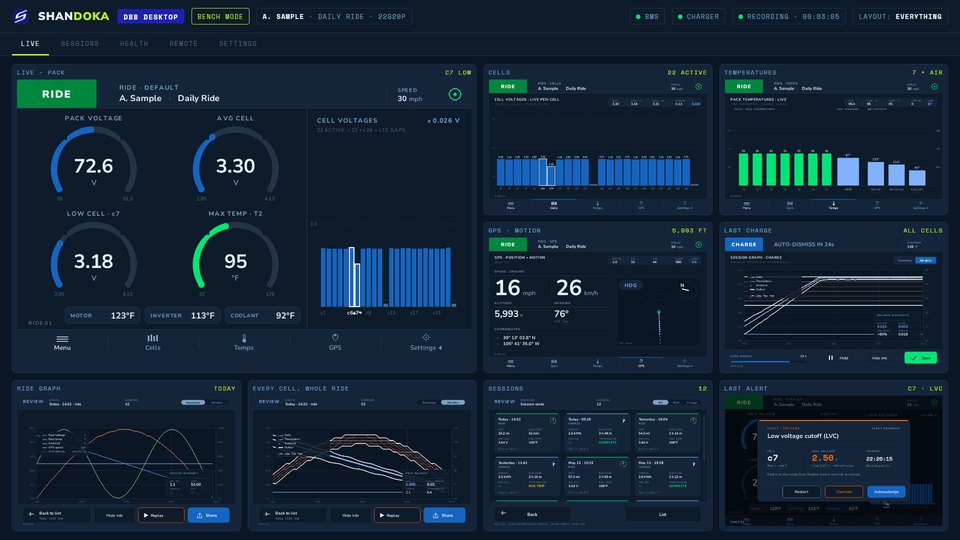
Plug the computer into the bike's BMS and charger and you get every live view the DBB has, at desk size: each cell, each thermistor, the charger and faults as they happen.
Change BMS and charger limits from the bench inside the same safe bounds the handheld keeps, and record the session the same way. When the bike's on a stand and you're chasing a fault, you'll want the big screen.
Every view is a tile. Put them all up at once, or give one of them the whole screen.
Pack gauges, cells, temperatures, the last charge and your session history side by side, the way the screen above is set up.
When you're chasing one cell that sags on hills, give its voltage the whole screen and keep the rest in the background.
Every tile is a DBB screen from the bike, so there's nothing to learn twice.
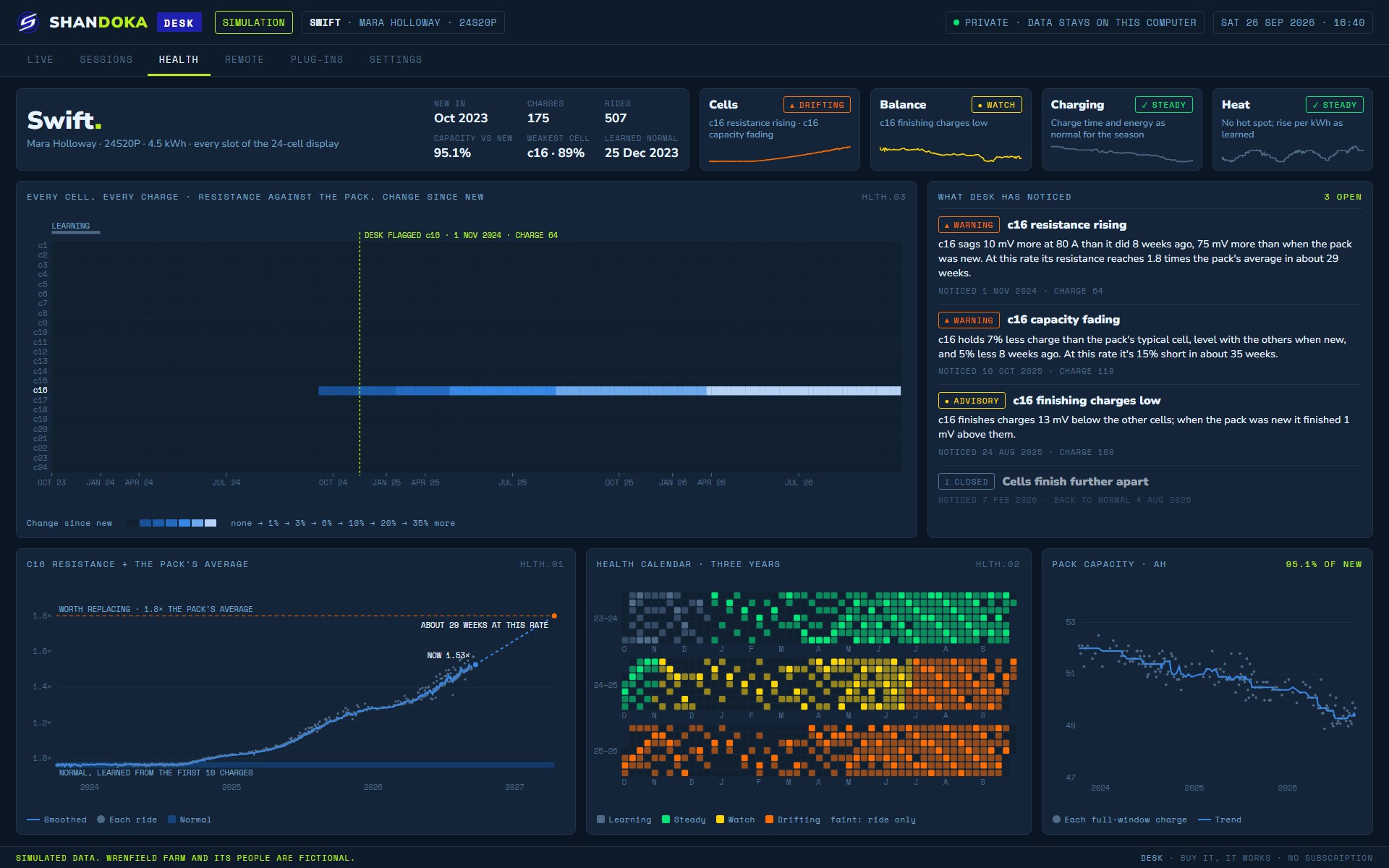
DBB Desktop reads your sessions in order, ride after ride and charge after charge, and learns what normal looks like for your system.
When a cell starts sagging a little earlier every week, or a charge takes longer than it did last month, you'll see the trend while it's still a tune-up. That's how you keep a motorcycle or a custom EV tuned and running smooth.
Follow three years of one pack through Desktop's health view.
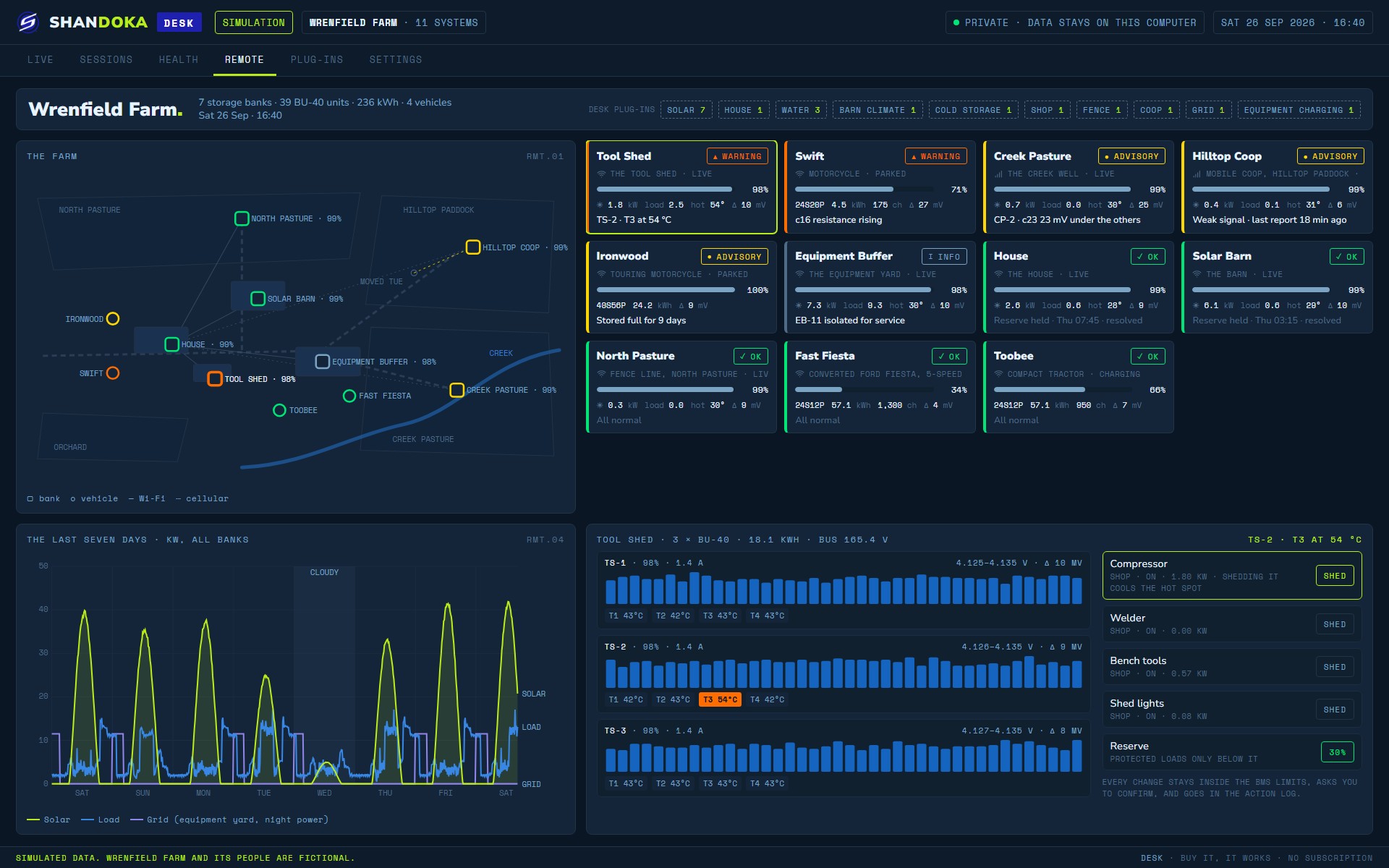
Keep watch on more than one system from one dashboard: bikes in the shop, a customer's pack between visits, or a stationary battery bank across town.
See which one needs attention, open its live readings, and pull up the log that led to an alert. See a whole farm on one dashboard.
DBB Desktop runs as a standalone application at the bench, with no handheld needed. Add it to a DBB on the bike and your ride and charge sessions come across to Desktop, where they join the long-term history.
On Desktop the same as on the bike. What it learns about your system comes from your own sessions, and they belong to you.
Desktop is the add-on application, and here's how it sits beside the units for the bike.
| Feature | Beta$699 · tester unit, now | LiteAt release | FullAt release | ProAt release · portable | DesktopAt release · add-on app |
|---|---|---|---|---|---|
| Every DBB | |||||
| It's your private data | Included | Included | Included | Included | Included |
| Every cell and every thermistor, live | Included | Included | Included | Included | Included |
| Charge monitoring from both ends | Included | Included | Included | Included | Included |
| Faults and alerts that name the cell | Included | Included | Included | Included | Included |
| Session logging, review and replay | Included | Included | Included | Included | Included |
| On the bike | |||||
| 4.3″ touchscreen | Included | Included | Included | Included | Your computer's screen |
| Change settings in the vehicle | Included | View only | Included | Included | At the bench |
| GPS speed, altitude and track | Included | Not included | Included | Included | Not included |
| Motion sensors | Included | Not included | Included | Included | Not included |
| Radios | BluetoothWi-Fi | BluetoothFor backups | BluetoothWi-Fi | BluetoothWi-FiCellular | Not included |
| Battery pack for portable use | Not included | Not included | Not included | Included | Not included |
| Sessions sync to DBB Desktop | Included | Included | Included | Included | Receives them |
| DBB Desktop | |||||
| Bench mode: every monitoring feature, plugged in at the bench | Not included | Not included | Not included | Not included | Included |
| Modular dashboard: watch everything, or one thing | Not included | Not included | Not included | Not included | Included |
| Runs standalone, no handheld needed | Not included | Not included | Not included | Not included | Included |
| System health that learns from your sessions over time | Not included | Not included | Not included | Not included | Included |
| Remote system monitoring dashboard | Not included | Not included | Not included | Not included | Included |
| Battery health analysis | Not included | Not included | Not included | Not included | Included |
BluetoothWi-FiCellular
Beta units ship now at $699. Lite, Full, Pro and Desktop follow at release, each at its own price. Everyone on the waitlist saves $99, whichever they choose.
No. Desktop runs on its own at the bench. With a DBB on the bike as well, your sessions from the road join Desktop's long-term history.
The same ones the DBB reads: many popular BMS, charge management and EV drive systems, with more integrations being finalized.
Everyone on the waitlist saves $99, whichever DBB they choose: an early-release tester unit now, or DBB Lite, Full, Pro or Desktop when they're released. Tell us what you run and how you'd use Desktop.
