Solar storage at the house, a bank in the barn, a pump at the creek and a coop that moves every week. DBB Desktop keeps them on one dashboard with the vehicles that charge from them, puts the ones that need you at the top, and lets you shed a load from wherever you are, inside the limits you set.
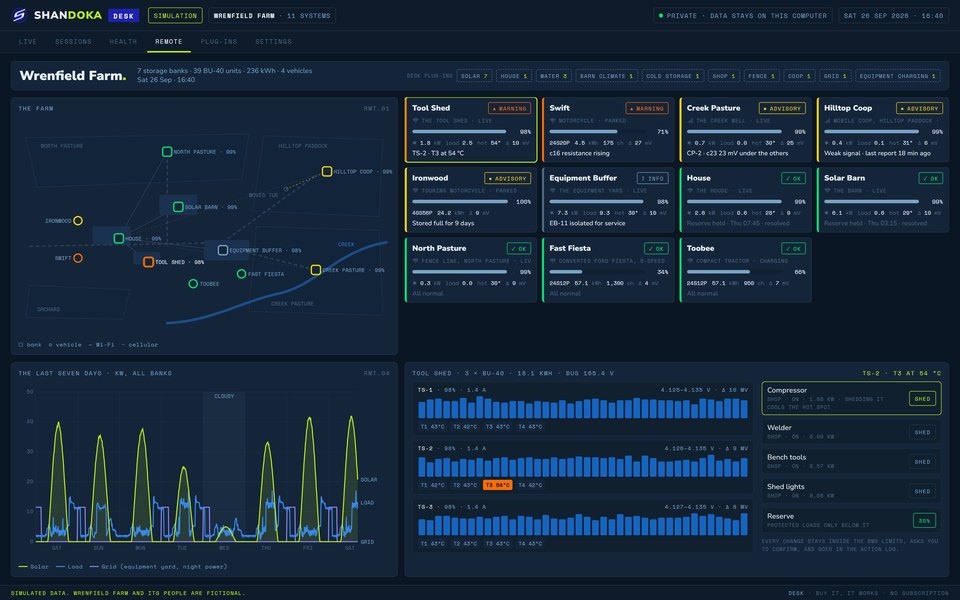
Wrenfield Farm is a simulation we built to show DBB Desktop at work on a homestead. It's a fictional 60-acre organic farm with laying hens, broilers, a small flock of sheep and a few dairy goats, run by the Holloway family. Its seven battery banks and four vehicles were run through a week of weather with a cloudy Wednesday in the middle.
Every bank on the farm is built from the same 40-cell unit of about 6 kWh, so the north pasture's fence runs on one unit and the equipment yard on sixteen.
Two large banks of eight units each, on roof and barn solar. They carry the house, the freezers, well pressure, the milk chiller and the brooder.
Three units behind the compressor, the welder and the bench tools.
The north pasture's fence and trough, the creek well pump, and one unit that travels with the mobile coop.
Sixteen units filled by solar during the day and grid power overnight. It charges the tractor by day and the car at night.
Two motorcycles, a converted Ford Fiesta that kept its 5-speed, and a compact tractor with the same pack as the Fiesta.
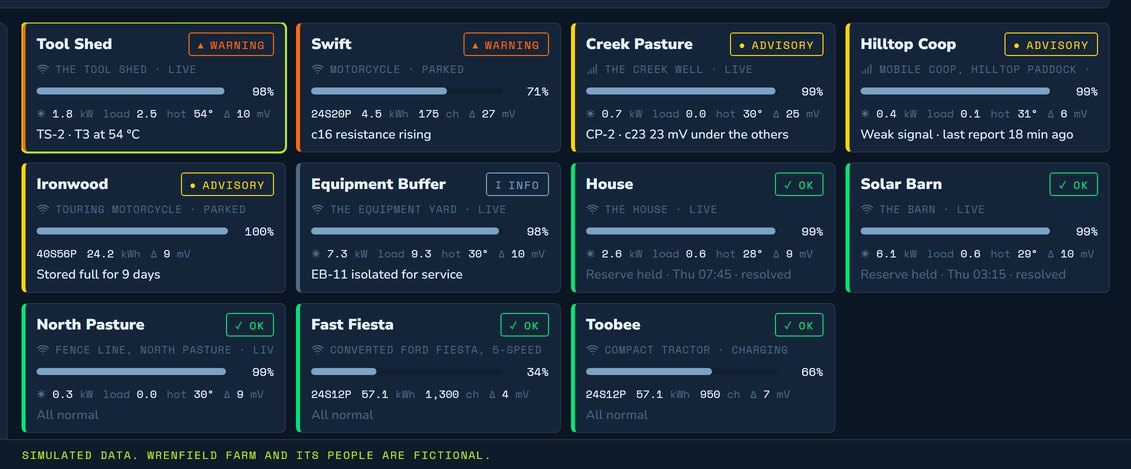
Each bank and vehicle gets a card with its link, when it last reported, its state of charge, energy in and out today, the spread between cells, the hottest thermistor and anything active. Cards that need attention sort to the top.
On this Saturday that's the Tool Shed, with one thermistor at 54 °C, and Swift, the smaller motorcycle, whose cell c16 is drifting. The creek bank has a cell running 23 mV under the others, and the coop last reported 18 minutes ago.
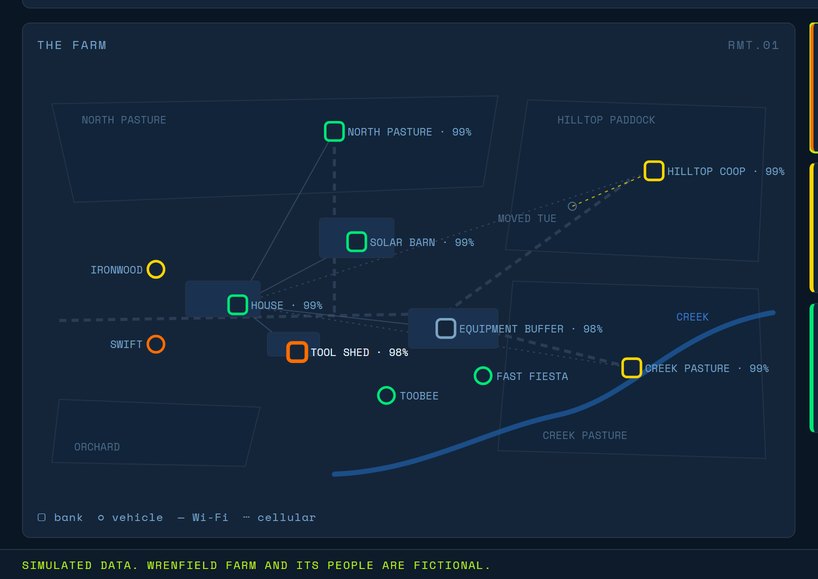
The map puts each bank and vehicle where it lives, in the same colors as the cards.
The mobile coop moved on Tuesday and its bank went with it, so the map shows where it's parked this week.
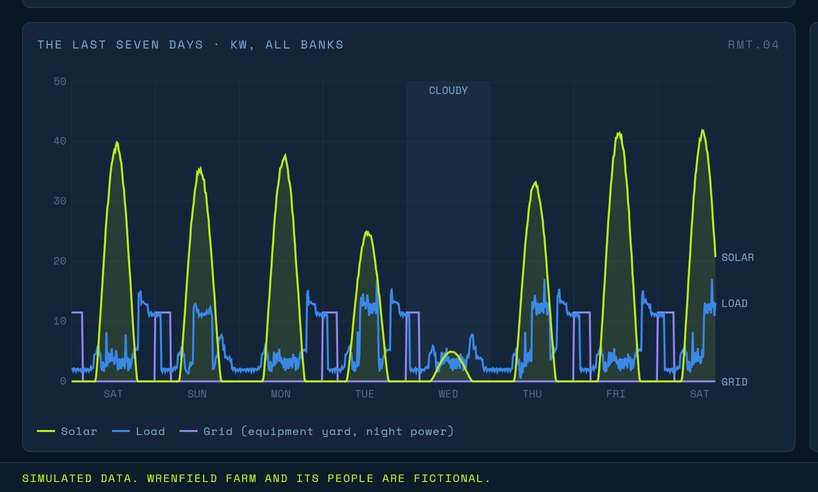
The energy chart shows solar coming in, load going out and grid power drawn at the equipment yard overnight, for every bank across the week.
Wednesday was cloudy. With the brooder running through the night, the Solar Barn reached its reserve at 3:15 on Thursday morning, and the House reached its own at 7:45. Below the reserve only protected loads run, so the barn kept the brooder and the milk chiller and let the lights and fans go. Both banks recovered once the sun was up.
From a bank's page you can shed a load, set the reserve or take a unit out for service. The Tool Shed's hot spot comes from the compressor running through a warm afternoon, and shedding it cools the thermistor and slows the discharge.
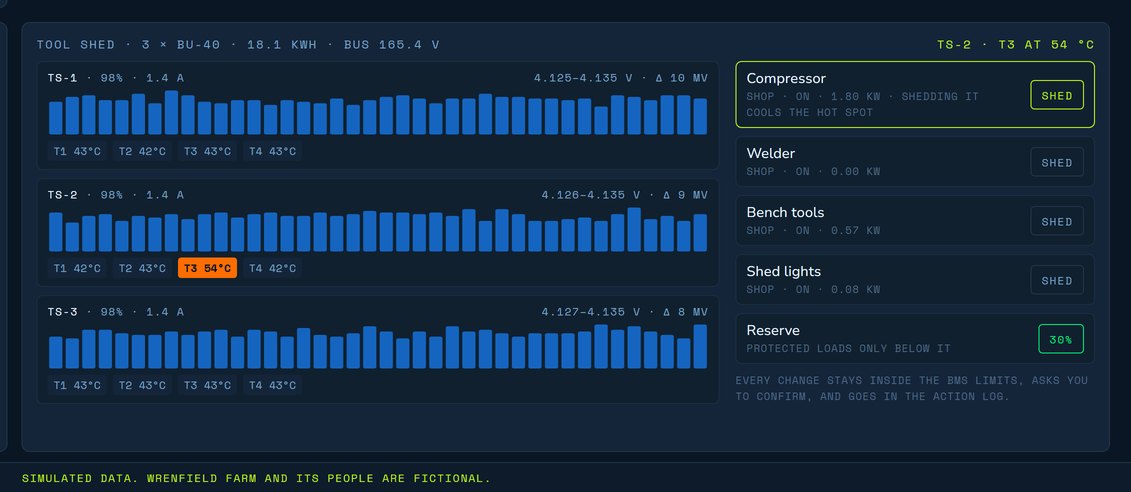
The controls cover load outputs, each bank's reserve, the charge window, current and order for vehicles at the equipment yard, taking a unit out of service and back, balancing on the next full charge, and alert thresholds with quiet hours.
Desktop reads the batteries on its own. Plug-ins add the equipment around them, each with its own tiles and controls, and you turn on the ones you have.
What each array made, what went into storage and what went straight to loads.
Well and trough pumps, and tank level.
The energizer, kept on as a protected load.
Fans, brooders and heat lamps.
The queue and the charge window for vehicles and tools.
Backup generation, for places that have it.
A bank at the far end of a pasture can lose its link. Its card shows when it last reported, so you know how old the numbers are, and the unit keeps its own log while it's out of reach.
Desktop watches, logs and switches the loads you connect through plug-ins. The BMS and your installation's own protection stay in charge of keeping each bank safe.
Yes. Remote installs report to the dashboard, and you can open any one's live readings and its log from wherever you are. More on remote battery monitoring.
Desktop reads the same systems as the DBB: many popular BMS, charge management and EV drive systems, with more integrations being finalized. Plug-ins add pumps, fences, climate and charging by type of equipment. Tell us what you run on the form below.
Only by the rules you give it. Below a bank's reserve only protected loads run, and every other change waits for you to confirm it.
On your computer. It's your private data.
No. Buy DBB Desktop and it works.
Everyone on the waitlist saves $99, whichever DBB they choose: an early-release tester unit now, or DBB Lite, Full, Pro or Desktop when they're released. Tell us about your farm or homestead and what you'd want to watch.
